I had a fairly simple request.
I wanted my photos available on my phone, my movies on the TV, my files on my laptop, and a few useful applications accessible wherever I happened to be. Preferably without losing anything important or turning everyday life into an IT support ticket.
Sounds reasonable, right?
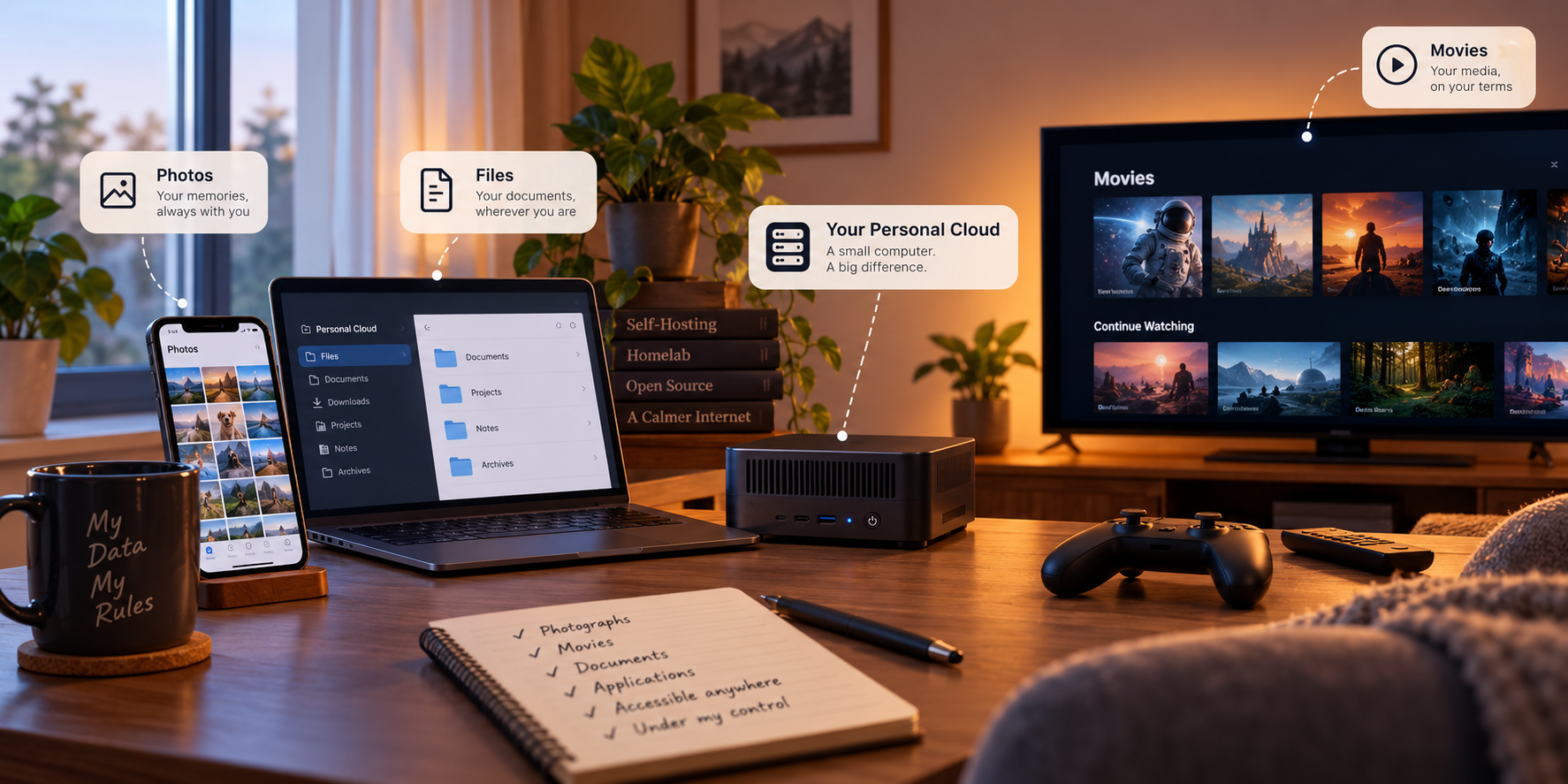
Now imagine taking that request to an infrastructure architect.
Who needs access? From where? What happens if the internet goes down? How much downtime is acceptable? What does “don’t lose my photos” actually mean?
Suddenly, the simple request has a surprising number of footnotes.
In this particular project, the client and the architect happen to be the same person. Me. Convenient for scheduling meetings. Less convenient when the client keeps changing the requirements.
In my previous essay, I wrote about how an attempt to watch Friends eventually led me to build a homelab. It started with a media server and evolved into a place for photos, documents, applications, and even this website.
This time, I want to look at it differently: what if we approached that personal cloud the way an architect approaches a solution design?
My homelab didn’t begin with a formal requirements document. It grew as I needed things. So this is a thought experiment grounded in the system I actually run: start with the needs, ask the awkward questions, weigh the trade-offs, and see what design emerges.
The First Meeting: What Are We Actually Building?
The most useful question at the beginning of a design isn’t Which technology should we use?
It’s What are we trying to make possible?
For our personal cloud, the initial wish list is familiar enough:
-
Browse photographs and videos from a phone.
-
Watch personal media on different devices.
-
Keep documents available at home and away.
-
Let different people use the system without sharing one account.
-
Publish a website for anyone to read, while keeping personal data private.
These are functional requirements: things the system needs to do.
But a system that technically performs all five could still be terrible to use. Imagine a photo library that takes a minute to open each picture, or a file service that works beautifully until you leave the house.
So we also need non-functional requirements: how the system should behave. It should be responsive, secure, maintainable, reasonably affordable, and able to recover important data after things go wrong.
That’s where the conversation gets more interesting.
Client: I want my photos available anywhere.
Architect: Anywhere? Even if the internet at home goes down?
Client: Ideally. And I really don’t want to lose them.
Architect: We’ve added availability and disaster recovery to the wish list in about ten seconds.
A request to access photos while traveling is different from a requirement to keep them available during a home internet outage. And “don’t lose them” could mean surviving a failed disk, an accidental deletion, or the loss of the entire server. Each answer leads to a different design.
A good architect keeps asking questions until words like secure, fast, and reliable start turning into decisions that can be tested.
For this design, the priorities are not equal. Losing irreplaceable photos matters far more than losing movie night. Private files need stricter access controls than a public blog. Some downtime is acceptable, but losing data because one disk stopped working is not an acceptable plan.
In a commercial project, we would turn those priorities into measurable targets—availability objectives, recovery time objectives (RTO), recovery point objectives (RPO), and so on. I’m not going to pretend I negotiated a formal service-level agreement with myself. The priorities are enough to make meaningful choices here.
Then Reality Joins the Meeting
A requirements list is a wish list until you introduce constraints.
My primary server is a Minisforum mini PC with an Intel Core i5-1250P processor, 64 GB of RAM, and a 1 TB NVMe SSD. It runs Ubuntu Server and connects to external storage. The network is a normal residential connection, not a private fiber link to a data center.
There’s also a finite budget, limited space, and one operator. Me.
I could build a three-node cluster, add redundant network switches, and deploy Kubernetes. I’d certainly learn from it. But it would also create more hardware to buy, more systems to maintain, and more ways for a simple application to have a complicated day.
None of that automatically makes the photos load faster.
So the first major design decision is deliberately unexciting: one compute host, with most applications running in Docker containers managed through Docker Compose.
Containers package applications with their dependencies and keep them reasonably separated from other workloads. Compose makes those workloads easier to define and redeploy consistently. For the number of users and applications involved, that solves the immediate problem without requiring a distributed orchestration platform.
It also means the mini PC is a single point of failure. If it dies, many services go down together.
That’s not an architectural secret to hide in a footnote. It’s a trade-off we’re accepting because the cost and complexity of high availability would outweigh its value for most of these workloads.
If the requirements change, the decision can change too.
Drawing the Architecture From the Outside In
Now we can start sketching the system. Rather than listing software alphabetically, let’s follow the experience of somebody using it.
A Photo at Home
I open my photo library while connected to home Wi-Fi. The application needs to find the server and retrieve the photo. Ideally, that traffic stays inside the house.
DNS—the service that translates familiar names into network addresses—helps my devices find internal application endpoints. Traefik, a reverse proxy, routes many incoming requests to the correct application based on the hostname.
Think of Traefik as a building receptionist. You ask for a particular office; it knows where to send you. You don’t need to memorize a different entrance and door number for every service.
This is a useful bit of separation: devices use consistent names, while the applications behind those names can change without requiring everyone to learn a new address.
The Same Photo, Somewhere Else
Now I’m away from home. My phone can’t simply assume it can reach an address on my home network.
Client: The blog should be public. My personal documents definitely shouldn’t be.
Architect: So “accessible from anywhere” doesn’t mean “accessible by everyone.”
Client: That sounds like an important distinction.
Architect: It tends to be.
For private connectivity from authorized devices, I use Tailscale, which creates a private overlay network between devices. For selected public services—like this blog—I use Cloudflare Tunnel to route requests through an outbound connection from my environment, rather than using conventional inbound port forwarding.
Those are deliberately different access models.
A public website is meant to be found by strangers. My private documents aren’t. Putting both behind some form of encrypted connection wouldn’t erase that distinction.
And a tunnel is not a magical invisibility cloak: if an application is available publicly, it still needs to be secured like a public application.
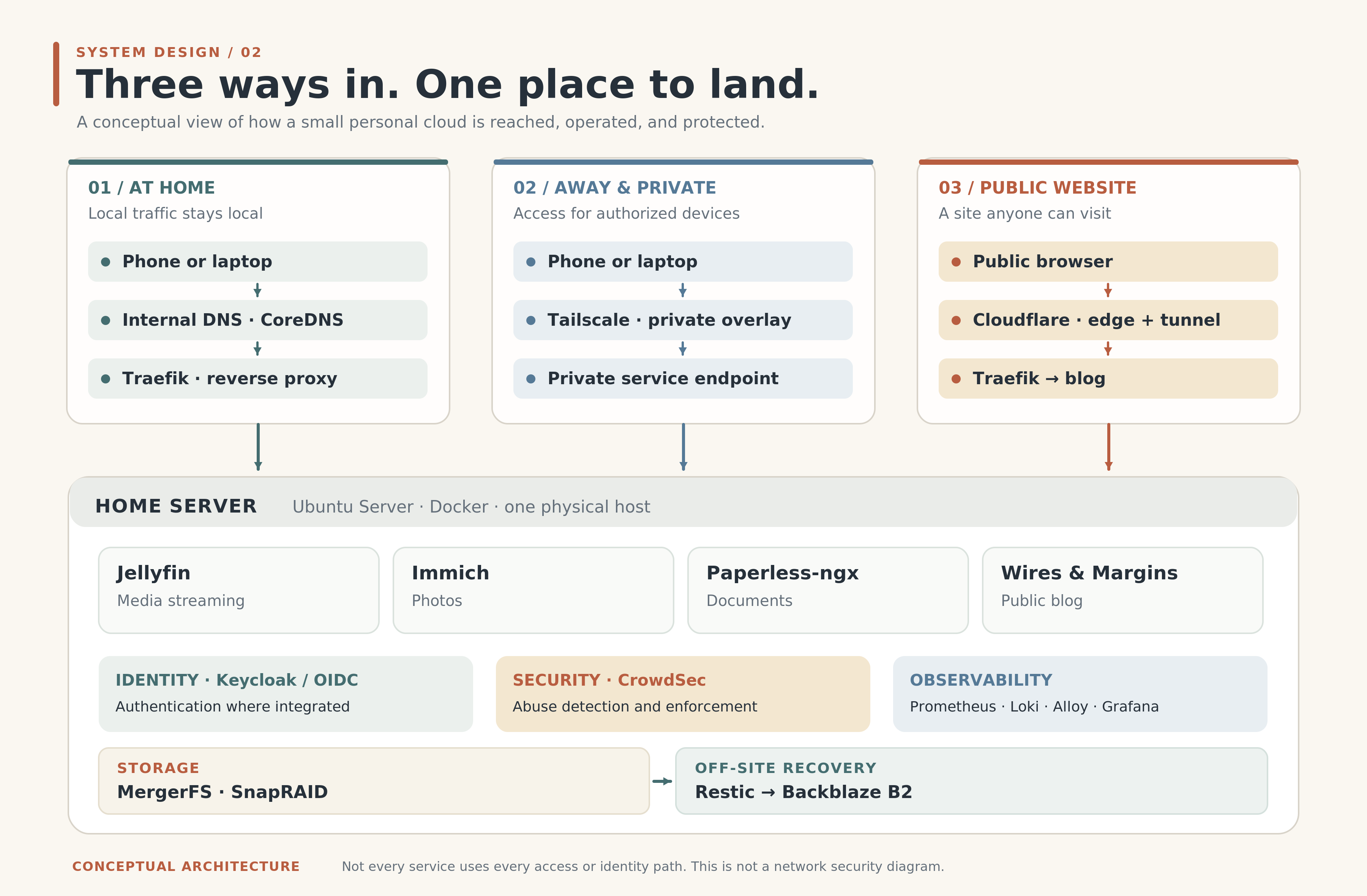
Figure 1 — Local, private remote, and public access follow different paths. Select the diagram to view it full-size.
Reaching Something Isn’t Permission to Use It
A visitor can enter a hotel lobby. That doesn’t mean they have a key to every room.
Infrastructure has a similar distinction:
Connectivity means you can reach a service. Authentication establishes who you are. Authorization determines what you can do once you’re inside.
For applications that support OpenID Connect (OIDC), I use Keycloak as a centralized identity provider. That lets compatible applications rely on a shared authentication system instead of each inventing its own login arrangement. The applications still need appropriate authorization rules.
Other controls handle other risks. TLS protects data in transit. Some paths use client certificates for stronger access controls. CrowdSec helps detect certain suspicious behavior and supply blocking decisions to the access layer.
None of these is a substitute for updating software, reviewing permissions, or being selective about what becomes public. They’re different layers addressing different failure modes.
The architectural principle is simple enough: two applications don’t deserve the same access policy just because they live on the same machine.
“Please Don’t Lose My Photos” Is Not One Requirement
This might be my favorite example of how innocent requirements turn into design questions.
Suppose we ask for one thing: keep the family photographs safe.
Which problem are we protecting against?
A hard drive dies. Someone deletes a directory by accident. A file gets corrupted. The entire server and its attached storage are lost.
All bad days. Not all the same bad day.
Client: I have multiple hard drives. So my photos are backed up, right?
Architect: What happens if you accidentally delete the folder?
Client: I was hoping you wouldn’t ask that.
My storage uses MergerFS to present multiple physical drives as a single logical pool. It’s convenient for organizing data and growing capacity incrementally. SnapRAID adds parity protection against certain disk failures.
But parity isn’t a time machine. SnapRAID’s parity is updated through synchronization, so changes made since the last sync may not be protected. And parity doesn’t rescue a file simply because somebody deleted it intentionally—or accidentally with a very confident terminal command.
That’s why important data also needs independent backups. I use Backblaze B2 for off-site protection, so recovering critical information doesn’t depend exclusively on the storage enclosure sitting next to the server.
Yes, I built a personal cloud and still use a commercial cloud service. Architecture is full of these little plot twists. The goal is to protect data, not win a philosophical argument against someone else’s data center.
Here’s the distinction worth remembering:
-
Capacity answers: How much can I store?
-
Redundancy and parity answer: Can I tolerate certain hardware failures?
-
Backups and recovery answer: Can I get my information back after it’s lost or damaged?
A solution can have lots of storage and still be fragile. It can survive a failed disk and still be vulnerable to accidental deletion. And it can have backups without meeting a particular recovery-time promise.
Those are separate design questions, which is why they need separate answers.
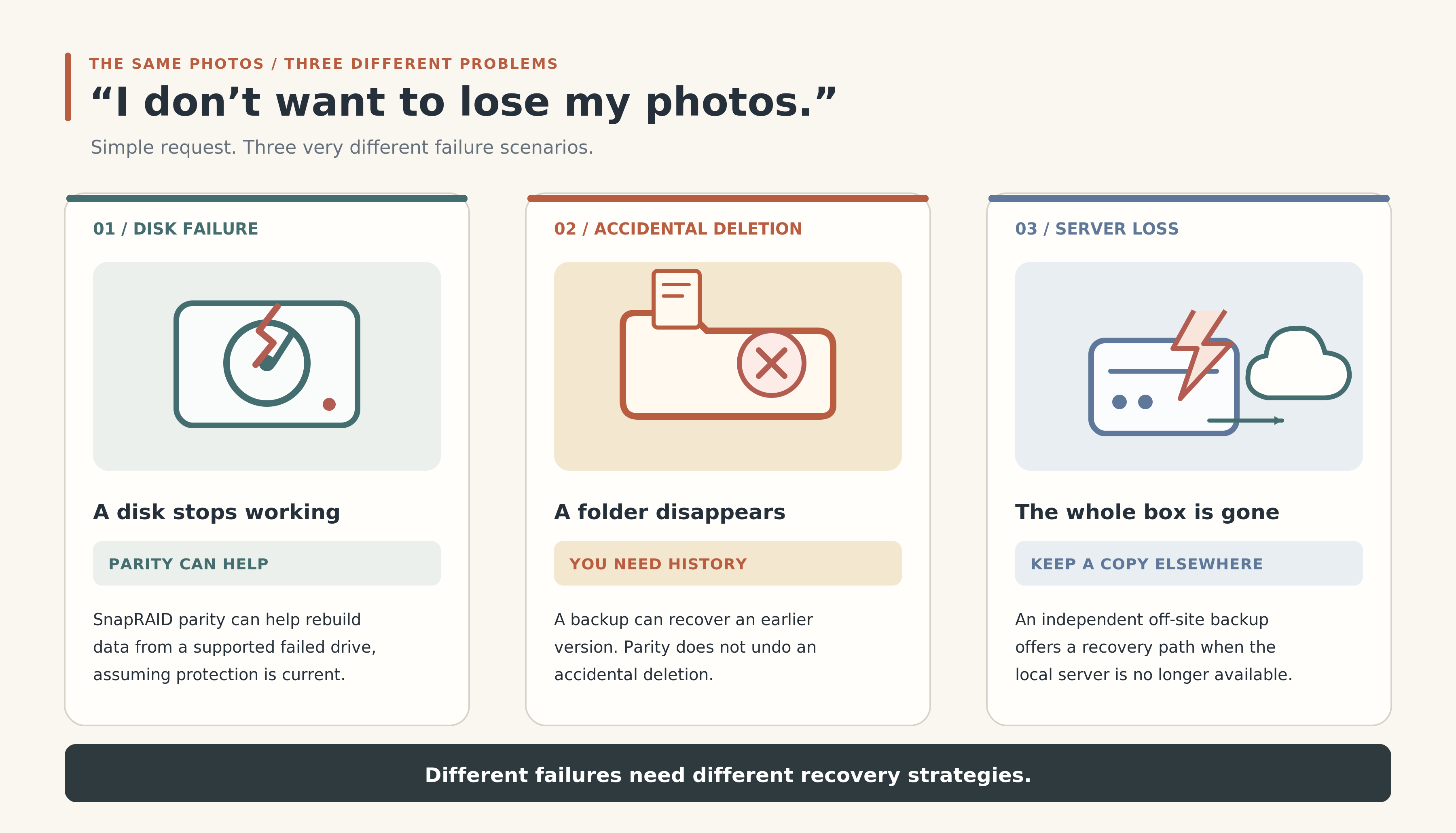
Figure 2 — Disk failure, accidental deletion, and losing the whole server are three different recovery problems. Select the illustration to view it full-size.
The System Shouldn’t Need a Babysitter
Another requirement often hides behind the words easy to maintain.
Imagine a disk slowly filling up or an application restarting repeatedly. The system may appear fine until one day a feature stops working, usually at the exact moment somebody wants to use it.
I’d rather discover an issue from useful telemetry than from a message asking, “Why are the photos broken?”
That’s where observability comes in: understanding a system from the information it produces.
My setup uses Prometheus for metrics, Loki for logs, Alloy for telemetry collection, and Grafana for dashboards and investigation.
But installing four monitoring tools doesn’t automatically mean you understand anything. A dashboard with fifty beautiful graphs can still fail to answer the one question that matters: What’s wrong?
I care about practical signals. Is a disk getting full? Is an application restarting? Are requests failing? Is the problem in the network, the host, or the application itself?
There is a limitation here, too: if monitoring runs on the same machine and that machine goes down, parts of the monitoring stack go with it. That boundary matters when deciding how much independent availability monitoring is needed.
The point of observability isn’t to spend evenings admiring dashboards. It’s to know when something needs attention—and to make the inevitable troubleshooting less mysterious.
Every Decision Has a Receipt
By now, we have the beginnings of an architecture. But a diagram alone isn’t a design argument. We should be able to explain why we chose one approach over another.
Here are a few decisions in plain English:
-
Do we need a cluster?
Choice: One host with Docker Compose.
Trade-off: Simpler operations, but no automatic host failover. -
Should every service be public?
Choice: Separate private and public access paths.
Trade-off: Some private access requires authorized devices. -
Is parity enough to protect data?
Choice: Independent off-site backups for important data.
Trade-off: Additional storage costs and a recovery process to maintain. -
Do we need to monitor everything?
Choice: Focus on signals that answer useful operational questions.
Trade-off: Less exhaustive data, but less noise and overhead.
Notice what’s missing: a declaration that any particular product is universally best.
The correct choice depends on the requirements and the consequences of getting it wrong. A bank and a family movie library may both run software, but they should not have identical availability targets. An outage is not automatically a disaster; sometimes it’s just movie night being rescheduled.
And sometimes a technology is worth introducing simply because you want to learn it. That’s a perfectly good reason for a personal experiment. It just shouldn’t be confused with a workload requirement.
Let’s Give the Architecture a Bad Day
Before calling the design finished, I’d rather test the assumptions than admire the diagram.
The internet goes down. Can I still reach applications locally? Which features depend on external identity or connectivity services? A design that assumes “internet available” everywhere may be more fragile than it looks.
A stranger finds my blog. Good—that’s the point of a public website. But can that visitor reach a private application or administrative interface? Public routing and private trust boundaries must remain separate.
A disk fails. What does parity actually protect, and how current is it? If the wrong files disappear, can an independent backup restore them?
The mini PC dies. The applications go offline. We accepted that risk. Now the relevant question is whether important data is recoverable and how much downtime the people using the system can tolerate.
Storage fills up. Do we have useful warning signals, and can we add capacity without redesigning the whole system?
These aren’t claims that every scenario has already passed a formal disaster-recovery test. They’re architecture validation questions. In a production engagement we’d translate them into acceptance criteria and run the corresponding tests.
Even in a small system, asking them exposes assumptions. And assumptions are much cheaper to discover in a conversation than during an outage.
The Diagram Will Change. That’s Fine.
The first version of my homelab didn’t need centralized identity, a public website, or this level of monitoring. New needs appeared, and the design changed with them.
That’s not necessarily evidence that the original design was bad. It’s what happens when requirements evolve.
A useful architecture decision should be explainable in one sentence: We chose this because of these needs, under these constraints, while accepting these trade-offs.
When the needs or constraints change, we revisit the choice.
There will always be another tempting technology to try. A second server, a storage redesign, an orchestration platform, another security component. Some will solve real problems. Others might be great experiments without earning a permanent place in the system.
The trick is to know which is which.
Back to the Original Request
We started with something ordinary: I want to find my photos, watch my media, reach my files, and not worry too much about what happens behind the screen.
To design that experience, we had to ask questions about users, networks, trust, hardware, recovery, and operations. The product names came later, when they had a problem to solve.
That’s the part of solution architecture I wanted to share. The job isn’t to start with an impressive diagram. It’s to ask the questions that make a sensible diagram possible.
My personal cloud isn’t a miniature version of AWS. It doesn’t have elastic capacity, geographically redundant services, or a team responding to incidents around the clock. And it doesn’t need to pretend that it does.
It’s a small system, designed around particular needs and imperfect constraints. Which makes it a useful place to practice the same thinking that applies to much larger ones.
Most of the time, when I open my photo library, I don’t think about DNS, reverse proxies, parity, or authentication. I just find the picture I was looking for.
That was the client’s requirement all along.
And for once, the architect and the client agree.